A Frequent concern of EV shoppers, particularly in the used segment, is battery capacity. All rechargeable batteries loose capacity over time. This impacts range in EVs. We will discuss how to evaluate the battery capacity using four different techniques one of which can be done in the dealer’s lot on any EV. If you happen to have a Nissan Leaf, I’ll share how to directly spot battery capacity from the Leaf’s dash. And lastly, specialized apps exist that can also provide a health estimate, which one you need depends on the car you are evaluating.
Use the guess-o-meter. Lets start with the simplest method that works in most EV’s, and you can do this while shopping in a used car dealers lot. EV’s all have a guess-o-meter that tells you how far you can drive on the charge you have remaining. We can do a little math and derive the usable battery capacity (in kWh) using the following formula:

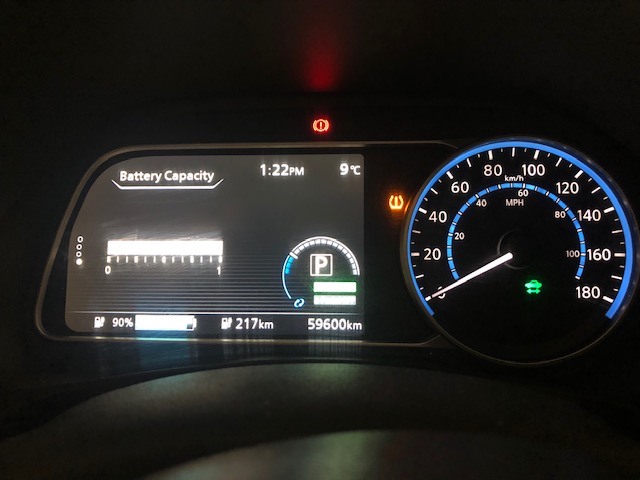
You will need the efficiency figure, which most EV’s will adjust to your driving style. Some models might have a number in the dash that you could use, but you can also use the efficiency column from my post on used EV’s. For example, for my 2018 Nissan Leaf, if the guess-o-meter says 217 km at 90% charge, and using 6.05 km/kWh we arrive at 217/(6.05 x 90 %) = 40 kWh. Even if there is an efficiency figure available in the dash, its often not the same as the one that is used by the EV’s guess-o-meter so this method, while simple, easy to do, and works in almost any EV, is not terribly accurate.
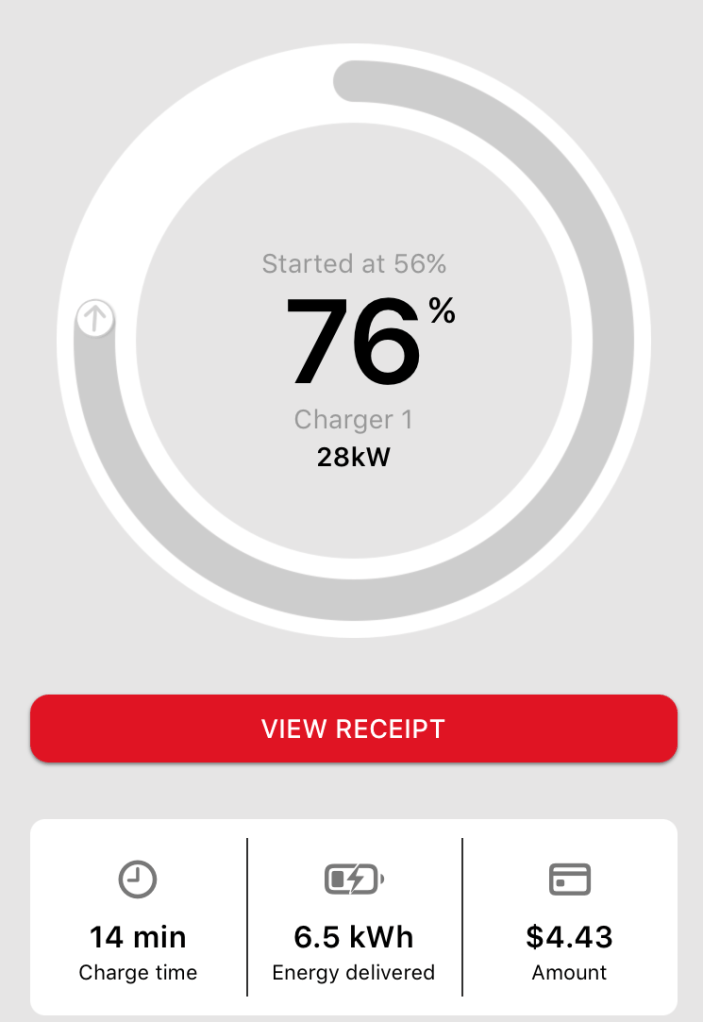
Charging receipts. When you use a public charger, particularly one that you pay for, a receipt is generated that tells you how many kWh went into your car, and in some cases, the % change in the battery charge level. Take for instance, a recent Petro-Canada charge stop, where I got the following receipt while charging my 2018 Nissan Leaf:
The following formula then reveals the usable battery capacity:

Using the numbers from my receipt, we arrive at a 6.5 kWh/(76% – 56%) = 32.5 kWh. Hmm, quite a bit lower than our earlier estimate. But there is some evidence to suggest that the % meter in the leaf is not being entirely truthful (for example this video (towards the end)). In my experience the leaf usually lets you use 36 kWh out of the 40 kWh rated pack, and tries to discourage you from using the last 4 kWh or so, as such 0% charge is around the 4 kWh mark, and 100 % charge is around 36 kWh, thus in some ways, Id expect to see 32 kWh here as adding 32 to 4 gets us 36 kWh which will make sense later. This is not surprising, given Nissan’s long history of making gas cars, where yes, the gas gauge usually looks empty when you have about 20-40 km of gas left, just to try to persuade you to behave.
If you happen to be looking at a Nissan Leaf, you are in luck as its one of the few (possibly the only one I have driven so far) that tells you how much battery capacity is available. If you are looking at another brand, you may want to skip ahead a little. And if you know of any other brand that offers this, leave a comment below and Ill update the post.
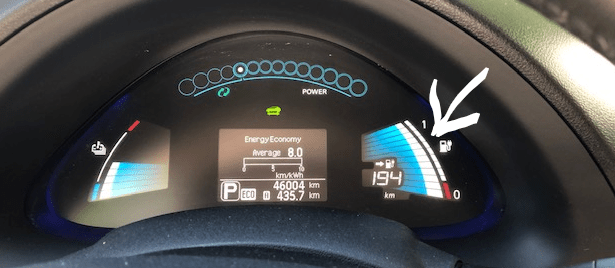
Nissan Leaf, first gen, 2011-2017. Battery capacity is shown right next to the available charge “bars”. The smaller bars to the right show the battery capacity (white arrow in the below image). Battery capacity above 87% or so, will show as 12 full bars. My 2015 Nissan Leaf S had 12 bars when we got it (at about 35k km) and still had all 12 when we traded it in (at about 65k km), I usually got about 22 kWh usable capacity, once managed 24 kWh, while in Winter it did drop to 20 kWh.
Nissan Leaf, second gen, 2018 to present. You need to scroll to the far left menu, the bottom most screen then shows the battery capacity from 0 to 1
Use a specialized app. Depending on your dealer (or perhaps more importantly how desperate they are to sell you the car), you can plug a Bluetooth onboard diagnostic (OBD) scanner into the car’s OBD port. Fire up a specialized app for your brand and get a very accurate reading on the car’s battery capacity. This is undoubtedly the most accurate method, but not always something you can do. If you are looking at a used EV, be sure to discuss with the current owner (or dealer) if they feel comfortable with you using an OBD scanner as there is a potential for disaster. After all, service technicians use OBD for all sorts of things like diagnostics, introducing new parts to the car’s computer, programing new keys and more. A malicious OBD app on your phone could certainly cause ample mischief so please be careful.
For the Leaf we have LeafSpy Pro, GM Bolt owners can use Torque Pro, and for Tesla drivers there is Tesla Spy. Since I happen to have a Nissan Leaf, lets have a look at the LeafSpy pro:
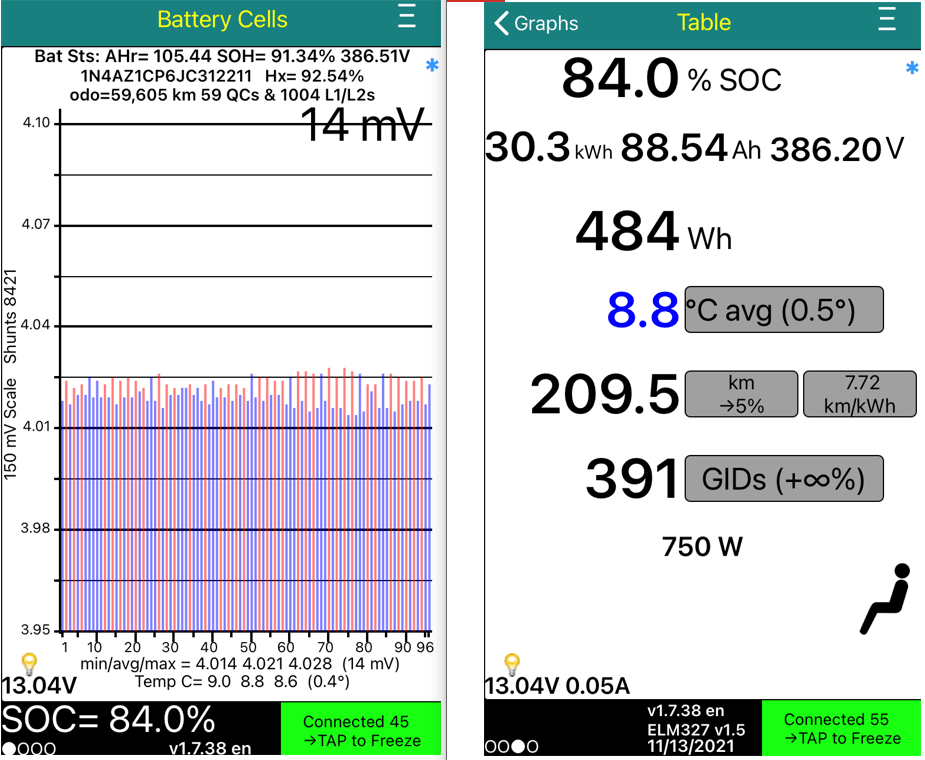
From the Leafspy screenshot, seems out battery is in excellent health with about 91.34% state of health (SOH), 30.3 kWh at 84% state of charge (SOC), thus a 30.03 kWh/84% = 36 kWh capacity when full.
Now that we have covered several methods for determining the usable battery capacity, lets compare the numbers we get for my 2018 Nissan Leaf. Guess-o-meter math got us nearly 40 kWh, Charging receipts led us to 32 kWh and LeafSpy pro yields 36 kWh. While the dash reports a 100 % battery capacity. At first glance, it is confusing having several methods that all yield slightly different answers. But keep in mind they all have different limitations, and together they can give you a pretty good idea of what you got, in my case a perfectly healthy 36 kWh usable battery for my 2018 Nissan Leaf.
 Electric car adventures
2 thoughts on “Evaluating battery capacity”