Last quarter, we discussed EV charging in general terms. Now lets dive deeper and look at how we can use Plugshare to find charging stations that work with my EV. We will cover some of the more common brands from my used EV survey, along with Tesla (excluding the roadster with its custom connector). We discuss the different plugs that might fit your EV, and how to configure Plugshare to display only charging stations compatible with your car. Further some hints on how to view recent checkins from other users to improve your odds of success when you get there.
Plugshare is a very useful tool to find working charging stations. While it is not the only tool out there, I find at least in Ontario Canada, it is updated regularly and has an active user community. It brings together information from all the major charging networks all over the world (who knew that the Galapagos Islands had a charging station). Granted it is not the only such tool, for example: Chargehub is another in North America, and Zap map I hear does well in Europe. Again much depends on where you live.
Below is a table outlining the plugs that can be found on several common EV’s found in the Used market in North America.
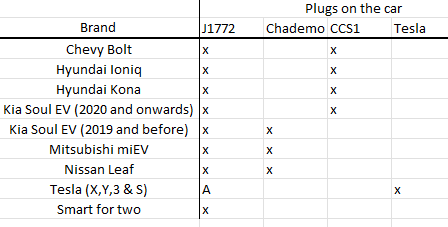
There are also adapters available, thus even if your EV does not have a Tesla connector, you might still be able to use Tesla destination chargers with this. Also Tesla sells an adapter allowing some Tesla cars to charge from a Chademo plug handy when roaming around say TImmins as the nearest supercharger is in Wawa 250 km away. There is also a rumored CCS1 to Tesla adapter in development.
You should also carry a good “granny-lead” which allows you to connect your EV to any household 110V outlet (or 220V if you live in Europe). I carry this one as it allows me with adapters to use a variety of outlets. From household 110V plugs, to 30 A RV plugs as well as the native Nema 14-50 plug. The charger also has adjustable current, allowing you to charge your EV in a variety of situations.
Whichever charger you choose, be sure you know how to stay within the limitations of the circuit you are connecting it to. Exceeding that limit will lead to all sorts of problems, ranging from having to reset the breaker to a major electrical fire. If you are in a new situation, a good rule is to not charge your EV unattended, at least not at first. Consulting an electrician is a great idea especially if you are considering your home or cottage charging setup.
Once you have determined the plug’s available on your EV, and any adapters you might have. Its time to set the plugshare filters to match. Go to plugshare.com (or use the app) and select “Plug filters” (sometimes shown as “8 plugs”). This should open the plug filter as shown below. Select the plugs compatible with your car (and adapters you may have). Note if you choose to set up an account with plugshare, you can tell plugshare what car you have, and enable plugs comparable with your car. Do note that you still may need to add plugs corresponding to any adapters you have as plugshare only shows “natively” compatible plugs.

Generally plugshare shows L1 & L2 charging stations in green, with fast L3 stations shown in orange. Depending on your car and driving style, L1 adds about 5-10 km of range per hour, with L2 adding 40 km/hr, and L3 about 200 km/hr. This all weaves into your trip-planning. On a longer journey I focus on L3 chargers as they are the fastest, while shorter to intermediate journey’s an L2 station is often sufficient and those are generally a lot easier to find.
Once you have identified a station, its time to see who else has been using the station recently so that you can gauge the likelihood of it being in working condition when you get there. Click on the green or orange icon to bring up the station details on the side-bar. Scroll down to the checkins section to see what recent users have to say about it. Below is an example from a L2 station in the greater Toronto area. This station has a J-1772 and a Tesla plugs, however looking at the checkins it seems only the Tesla destination charger is working at the moment. If you have a Tesla car, or if you have a Tesla to J-1772 adapter and a J1772 car, then no problem, otherwise Id consider this station out of business for now.
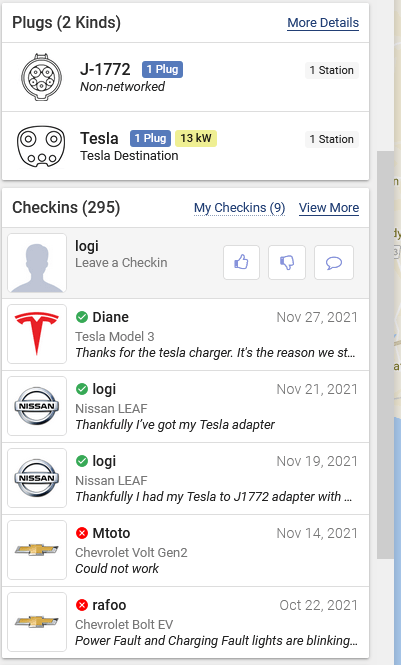
When planning your road-trip its a good idea to look for alternative charging stations. After all, the charging station shown above has only one serviceable L2 plug. So even if I can use it, another EV might be charging, so I need to make sure that I have enough range left to make it to the next station in case its busy or somehow a new problem has arisen recently.
 Electric car adventures
3 thoughts on “Charging 201: Using Plugshare”