As keen readers of this blog might have noticed, I drive a 2018 Nissan Leaf, which cannot plug into the Super-Charging network (although a complex adapter arrangement might make it happen source), however I recently did a road-trip in the Toyota BZ4X, with its CCS plug, can under certain circumstances. With a non-Tesla, you need to use the Tesla app to authenticate and arrange payment for your charging session, similar to other charging networks. It worked well, although as there is no screen, LED lights or anything on the supercharger stall to communicate with the user, it felt a bit weird at times.
The Tesla supercharging network usually does very well in charging network surveys (source), so it is high time I gave it a go. If you happen to own a Tesla, the experience is as simple as it gets, just plug in, and the car takes care of the rest, as authentication, payment etc. are handled in the back end.
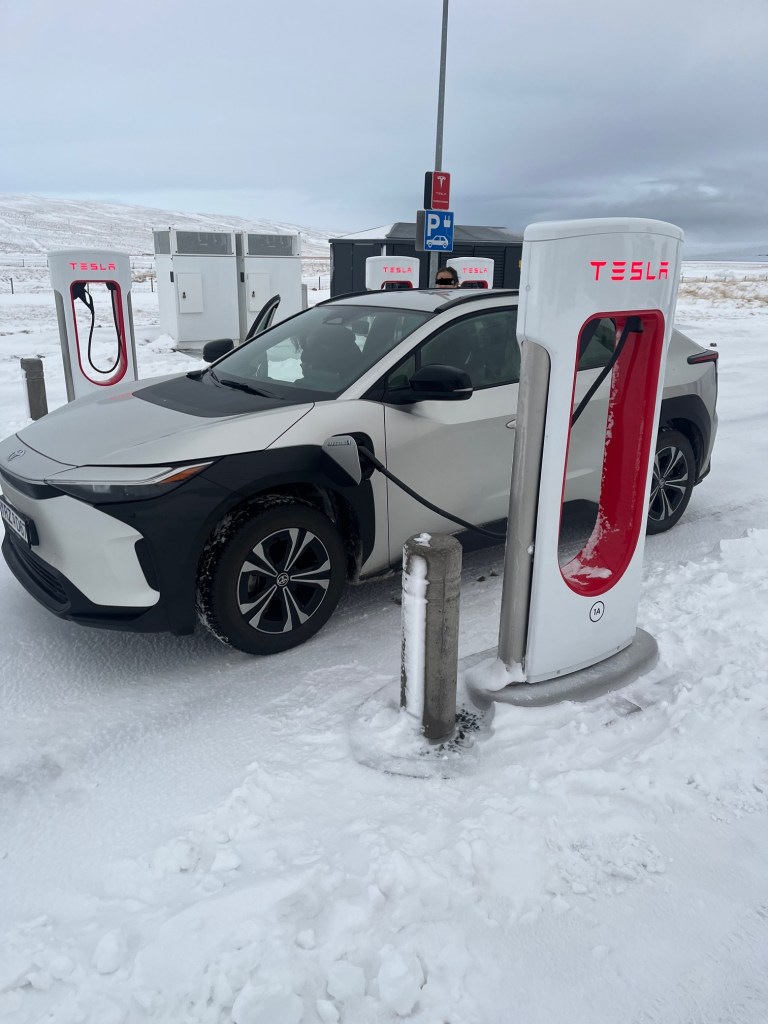
With a non-tesla its a little more complicated. On the hotel wifi the day before, I entered my payment details into the charging side of the Tesla app. Then once there, in the Tesla app, I went to “Charge my other EV”, then used the map to navigate to the charger I was at, clicked charge here, then entered the post number, and finally charge. Once that was done, I plugged in the car, and made sure both the app, and the car, told me that charging was underway.
Then it was time to enjoy some of the lovely lunch options on offer. As noted, both in this blog and elsewhere, my borrowed BZ4X has rather sub-standard fast charging (source, source). I observed 60 kW, top speed at the Tesla super charger, which was better than what I had been getting elsewhere during my time with the BZ4X. It took about an hour to replenish the battery from about 10% SOC, to 80%. But that’s the BZ4X, not the charger. But no matter, Lunch took about an hour anyways, and we were ready to hit the road.
I have always been impressed with the depth of the supercharging network. If you find a supercharging location, you will likely find a working charger. The location I charged at, had 16 stalls. Pricing wise, it was very competitive at about 50c/kWh, compared to 60-70c/kWh for other networks in the region. Parking was easy, there was plenty of space to park in and around the charger. Even with my BZ4X drivers-side front charge port location, made for some parking gymnastics, another Tesla owner was able to use the charger next to me.
There are three tings, that I felt could be done better:
- There is no feedback from the station to indicate if the car is actually charging. The car may tell you, but the station does not. Hence simple failures such as an expired credit card in Tesla’s payment system say, might go unnoticed for some time (source).
- The post-number is written only on one side of the charger on the bottom. Something on both sides, and on the top might make more sense to me. Snow often makes stuff at the bottom hard to read, but even better, a bar code sticker on the handle, along with some camera magic in the app, would have simplified the process, as some other charging networks do.
- Network breath is also a problem, I wonder if it would have been better to have two 8 stall stations instead of one 16 stall station. I counted 4 other cars charging at the supercharger when I was there, thus more locations might make more sense, see more here.
Overall, I was able to charge my borrowed BZ4X without issue at a Tesla supercharger location. There was no wait, and the pricing was good. It worked well enough, although I feel that bar-code on the handle trick, some other networks use, with some app-camera magic, would have simplified the authentication process. Plus it would have been nice to have some idea as to what the charger was up to, even a few LEDs (green – available, yellow – charging, red – see app for an error, say) would be helpful.
 Electric car adventures